


Everybody working most of the time in the command line can use shortcuts to enter, modify and change commands and will speed up the work.
Cursor movements
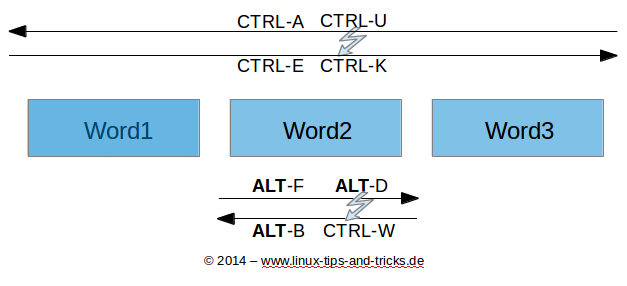
CTRL + A - Moves cursor to start of line
CTRL + E - Moves cursor to end of line
ALT + F - Move cursor forward one word
ALT + B - Move cursor backward one word
CTRL + XX - Move cursor to start or end of line (flip flop)
Erase
CTRL + U - Delete text from current cursor position to start of line
CTRL + K - Delete text from current cursor position to end of line
CTRL + W - Delete word in front of cursor position
ALT + DEL - Delete word after cursor position
ALT + D - Delete word after cursor position
Insert
CTRL + Y - Insert text from clipboard
!$ - Insert last word of previous command
!^ - Insert first word of previous command
ALT + . - Insert last word of previous command
Search
CTRL + R - Reverse search
CTRL + J - Terminate reverse search
CTRL + G - Terminate reverse search and restore old line
CTRL + P - Previous input
CTRL + N - Next input
Execute
!! - Execute previous command
!!:s/abc/def/ - Execute previous command and substitue abc with def
!n - Execute command n from command history
!abc - Execute previous command which started with abc
^abc^def - Execute previous command and substiture abc with def
Miscellaneous
ALT + U - Change next word to uppercase
ALT + L - Change next word to lowercase
CTRL + _ - Undo previous command
References
Bash shell shortcuts that every system administrator must know
Bash shortcuts: Quick reference